
Experience Virtual Stores in 3D
Overview
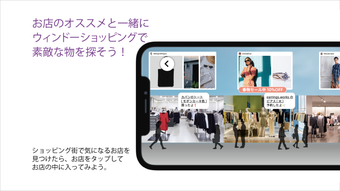
αU place delivers a unique virtual shopping experience by recreating physical retail environments in high-fidelity 3D. Designed for users who find online product information lacking or who lack access to nearby physical stores, the application bridges the gap between traditional in-store browsing and digital convenience. It enables users to explore lifelike store layouts, observe product placement, and interact with visual details such as pop-up displays and ambient lighting, all from their desktop. This immersive approach supports informed decision-making by allowing users to assess products in context, mimicking the sensory experience of visiting a real store.
The target audience includes shoppers seeking a more engaging and informative e-commerce experience, particularly those interested in lifestyle, fashion, or home goods where visual presentation significantly impacts purchasing decisions. The app is especially beneficial for individuals in remote locations or those who prefer visual confirmation before buying. By integrating direct links to e-commerce sites, αU place streamlines the transition from exploration to purchase, combining discovery with action. The developer, αU place, has focused on replicating real-world retail dynamics, offering a tool that enhances online shopping without requiring physical presence.
Key Features & Capabilities
- High-fidelity 3D store recreations – Accurately replicates interior design, lighting, and spatial layout of physical stores, enabling users to navigate environments as if present in person.
- Interactive product displays – Users can tap on white icons within the virtual store to view detailed product information, including specifications, pricing, and availability.
- Live staff assistance via video call – Some stores offer the “STAFF STAYLE” feature, allowing users to connect with retail staff for real-time product explanations and personalized advice.
- Seamless e-commerce integration – A “View on Website” button directs users to the store’s official e-commerce platform for immediate purchase, eliminating friction in the buying process.
- Exploration of store layout and product placement – Users can walk through virtual aisles, observe how items are arranged, and discover promotional pop-ups or limited-time displays.
These capabilities support a more confident and engaging shopping journey. For example, a user exploring a home decor store can assess how furniture is positioned in a room setting, evaluate lighting effects, and consult staff before purchasing. The app’s design prioritizes intuitive navigation, allowing users to move through spaces with minimal learning curve. The absence of physical constraints enables access to multiple stores across regions, offering a broader selection than local retail options.
User Interface, Workflow & Performance
The user interface of αU place emphasizes immersion and simplicity. Navigation is achieved through intuitive controls that allow users to move through 3D environments, with visual cues such as white icons highlighting interactive product points. The layout is designed to minimize clutter, ensuring that users remain focused on the store experience. Menus are accessible via a clearly labeled “STAFF STAYLE” option, which enables video calls with store staff when available.
Workflow efficiency is enhanced by the direct path from exploration to purchase. After identifying a product, users can tap for details and immediately proceed to the e-commerce site. The app maintains a consistent visual style across stores, promoting familiarity and reducing cognitive load. While specific performance metrics such as CPU or RAM usage were not provided, the 250 MB installation size suggests a lightweight footprint. The developer did not specify resource usage details, but the application’s design implies optimized rendering for desktop environments.
Stability and responsiveness are expected to be consistent with standard 3D desktop applications. Users can anticipate smooth navigation within virtual spaces, though actual performance may vary based on individual hardware configurations. The absence of reported crashes or bugs in public disclosures indicates a stable release. General software behavior patterns suggest reliable operation during typical usage sessions.
Compatibility & System Requirements
αU place is available for both Windows and Mac operating systems, making it accessible to a broad user base across desktop platforms. The software version is 1.0.0, indicating a stable initial release. The installation size is 250 MB, which is modest for a 3D application and suggests efficient file compression and optimized assets.
Exact system requirements were not listed. The developer did not provide additional details regarding minimum hardware specifications, such as GPU, RAM, or processor speed. Compatibility information is limited to the supported platforms. Users are advised to ensure their system meets general requirements for running 3D graphics applications. The absence of detailed specifications means that performance on lower-end devices may vary, though the app’s lightweight size may mitigate potential issues.
Pros and Cons
Pros
- Immersive 3D recreation of physical retail spaces
- Direct access to e-commerce sites for seamless purchases
- Interactive product details via tap-enabled icons
- Optional live video consultations with store staff
- Free to use with no subscription or hidden fees
Cons
- System requirements not publicly disclosed
- Staff availability for video calls may vary by store
- Limited to desktop platforms (no mobile support mentioned)
- Performance may depend on local hardware capabilities
- Not all stores may offer the full range of features
FAQ Section
Is αU place available for Windows and Mac?
Yes, αU place is compatible with both Windows and Mac operating systems, allowing users on either platform to access the virtual shopping experience.
Is the software free to download and use?
Yes, αU place is available at no cost. There are no subscription fees or in-app purchases required to access core features.
Can I speak with a store representative during my virtual visit?
Some stores offer the “STAFF STAYLE” feature, which enables users to initiate a video call with a store staff member for product advice and explanations.
Do I need an internet connection to use αU place?
Yes, a stable internet connection is required to access virtual stores, stream 3D environments, and connect with staff or e-commerce platforms.
Is my data secure when using αU place?
The application uses standard web security protocols for data transmission. While specific privacy policies were not detailed, the use of official e-commerce sites for purchases ensures that sensitive information is handled by trusted platforms.
Final Thoughts + CTA
αU place redefines online shopping by blending the tactile experience of physical retail with the convenience of digital access. Its 3D store recreations, interactive features, and direct e-commerce integration offer a compelling alternative for users seeking a richer shopping experience. The app’s free model and desktop compatibility make it accessible to a wide audience, particularly those who value visual context and expert guidance before purchasing.
While system requirements are not fully disclosed, the lightweight installation and stable release suggest broad compatibility. The inclusion of live staff consultations adds a human touch often missing in e-commerce. For consumers who desire a more engaging and informed shopping journey, αU place stands out as a forward-thinking solution.
Download αU place now to explore virtual stores in 3D and transform the way you shop online.







